|
|
|

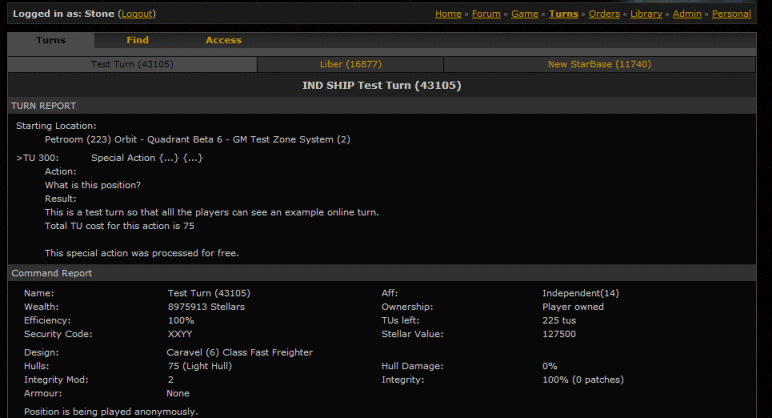
The turns tab shows your latest turns. In the turns sub-tab you will see the latest turn report for the position selected. In the case below it is IND Test Turn (43105). While this example only shows three positions, you can have up to ten listed here. They will always be the last ten positions you have looked at. They are stored as javascript on your local machine for speed loading when you come to this tab.
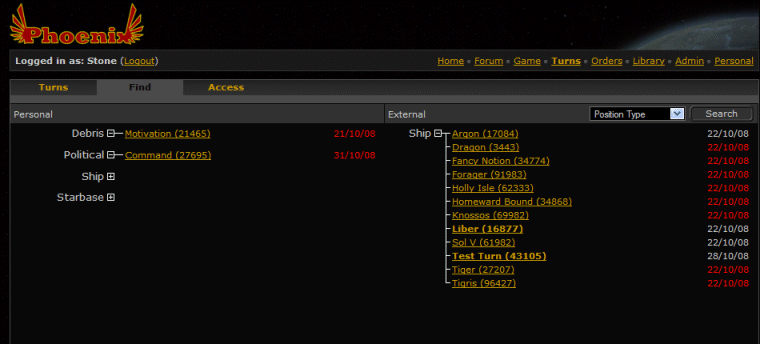
If you wish to look at the turn for a position that is not listed at the top, then you need to go to the find tab next.
Below are listed all the positions you have turns uploaded for on the left. On the right is the list of all the positions you have access to. This will include positions that other players have given you access to. Selecting any of these will return you to the turns sub-tab and display the turn. If there were already ten other positions listed, this turn will replace the one that has not been viewed in the longest time.
Red indicates that you have never looked at the turn while bold indicates that you have not looked at this latest turn.
Access
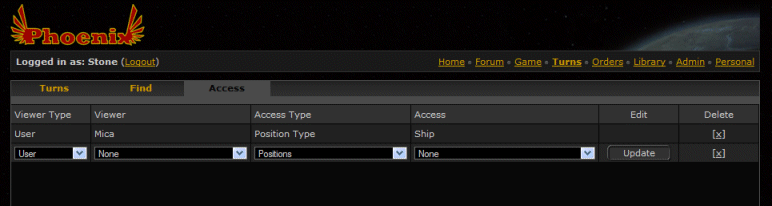
As well as being able to view your turns, you are given the capability of given access to other people. You might want to do this as part of a team effort, mutually sharing turns results.
An example would be a fleet action thereby ensuring that all ships in the fleet were doing the same thing.
If the fleet engaged in battle it would also allow fleet commanders to look at the ships in the fleet post combat and determine how to organise repairs and direct the rest of the fleet on what to engage on the following day.
You are given the capability of sharing individual positions and position types with individuals and groups. Together this gives you complete control over access to a position.
|
|
|
|
PayPal.Me/creditKJCaccount
Don't forget to include your account number in the message. |
|
|
*** Inter Galactic News ***
Solo claim swings back and forth
The situation in Solo appears to be getting even more heated. First the NHS dropped 600,000 troops to contest the system and then the DTR answered with enough troops of their own to trump the NHS claim. The NHS found yet more troops, taking the contesting claim up to 750,000 and once again the DTR answered, bringing Solo back under DTR control. Now the NHS have had a look down the back of the sofa and found yet more troops, taking the contesting claim to a massive 900,000 trained troops. We wait to see if the DTR have an answer to this. We can only guess where all these troops are coming from, but what is clear is that the established affiliations clearly have far larger armies than many thought.
|
|
|
*** Inter Galactic News ***
NHS attempt to claim Solo away from DTR
In a shock move the NHS have contested the Solo claim with a huge garrison of 600,000 trained troops. In a move that nobody saw coming, especially as it was unknown the NHS had such a large force of troops to draw upon, the NHS seem to be provoking a response from the DTR. Currently there has been no word from the DTR in how they are going to deal with this claim jumping, although rumours are that they are pretending the Solo claim doesn't really matter to them and so action is unlikely. However this may be a smokescreen and we may yet see the DTR's powerful fleet cause havoc in the system of Solo, which has for a long time been an important junction and fought over by many different factions.
DNA Chairman TonTon resigns
The following communication has been leaked from the DNA to the GTT's PD.
Greetings CEO Fox.
It regrets me to have to inform to you that the DNA nation state will be renouncing its claim on Aladdin system following a ceremony planet side, shortly.
However, it gives me great pleasure to have to inform you that these ceremonies are being planned by Vladimir Tavikovitch, the South Road Traffic Coordinator. He is also responsible for all DNA and .ore. assets in the Outer Naplian (Capellan) periphery so if there are any further issues, please take it up with him.
For any and all other matters, please forward your request directly to the DNA directorate services at NexusID: DNA people.
The Foreign Ministry objects one last time to your illegal claim jump of Aladdin, but we realise it is time to de-escalate.
Normally i would sign off with Naambta, but doing so would be hypocritical. Let me say good riddance instead.
I hereby resign in protest!
Chairman TonTon,
Foreign Minister, DNA
cc: Directorate Services personnel coordinator - !urgent resignation!
DTR threaten WMB with fines for multiple breaches of DTR Law
Lady Sylvansight of the DTR has issued a fine of 1,000,000 stellars to the Wimbles for multiple breaches of DTR Penal and Territorial Law. This seems a very brave move of the DTR to risk upsetting the huge and warlike WMB when they also have the rival NHS Solo system claim to deal with. No word has been recieved yet that the Wimbles are going to pay, but if the formidable WMB warfleet is seen heading for the DTR home systems we will know what their thought are on the matter. The DTR and WMB fleets going head to head would be a sight to behold.
*** Affiliations ***
AFT Association of Free Traders (54) - Marion Tweedy
BLG Bolg Organisation (22) - Akhenaten
CIA Combined Intelligence Agency (64) - Laton CIA
DNA Displaced Natives Asylum (66) - DNA people
DTR Detinus Republic (58) - Morley Decker
DWK Dewiek Packs (19) - <Unknown>
FCN Falconian Republic (70) – Graspien
FEL Felini Tyranny (49) - Kr'Shan
FLZ Flagritz Republic (47) - Kayxaer
FET Frontier Exploration & Trade (56) - Cu Chulainn
GTT Galactic Trade & Transport (52) - Xavier Fox
HEX Hexamon (23) - Tranquility
KRL Krell (30) - Namica
KRT Krell of the Reverence Temple (37) - Cyn
KST Kastor Kastorians (12) - Kastor
MOH Mohache (73) – Listens
NHS Noble Houses (41) – Roy Roberts
NLF Naplian Liberation Front (38) - NLFHQ
SMS Stellar Mining and Smelting (53) - MikhailM
WMB Wimble Nations (25) - zz
* Leader MAY be inactive, affiliation may be active
** Only known contact, please update us if this is incorrect.
NPC / FoC: ARC, CIV, CGT, FRE, HBO, HEF, IND, ISP, JCN, MEK, MRC, PIR, PRV, TCA, TRN, KAS
Inactive: ANT, COD, BHD, DEN, DOM, GCE, HVE, IDC, IMP, RIP, RCF, SKW, TAG,
*** Submissions ***
By private message to The Editor or via Mica if you prefer to remain anonymous. |
|
|
*** Inter Galactic News ***
DNA and GTT clash over Aladdin system claim while Pirates look on.
The GTT have this week launched an attack on the DNA outpost in Aladdin, in what appears to be little more than a turkey shoot. Around 100,000 GTT Naplian Startroopers attacked the DNA position to remove the rival system claim. Reports indicate the DNA garrison were taken by surprise and lost control of the base in the first few hours of the fighting. The base has since been reflagged from [Free Naplian Capital] Peaceful Protest to [Loyal Naplian Capital] DNA claim Ended so it's fair to say there was a clear message being sent by the GTT. We have been waiting for the DNA leadership to comment but so far they have been unusually silent. No doubt when they have crawled out from under their desks they will have something to say on the matter.
While this attack was going on several pirate ships were also seen in Aladdin, according to the GTT in what may be true or may be a diversion, with reports of a pirate GP and scout being destroyed while a 150HH pirate warship slipped away and escaped from incoming anti-pirate patrols.
Secret meeting of the EEM
A recent communication intercepted by one of our top reporters today made us aware of a meeting of the EEM. This is underway in a top secret location called Black Pool, which sounds suspiciously like the lair of a pirate band. After pulling in many favours, we were able to identify some of the attending members. On the bases that they won't be named we were able to find out some slight information of the subjects to be discussed at the meeting and one thing is for certain, there could be huge impacts to the lives of everybody living in the galaxy. Details to follow. When the shadowy figures of the EEM come together with the top political players in a pirate base the possibilities are endless!
You are never more than 6 systems from a RAT 🐀
A new saying has arisen in the bars and spaceport of starbases throughout the many peripheries; you are never more than 6 systems from a RAT.
It is understood that this saying originated in Yank and spread by trade vessels to peripheries far and wide. Many starbases have heightened their security and added additional sensors and locks to various entry points including foul and grey water outfalls. Beer and drug stocks are undergoing increased proofing to avoid the critters gaining entry and consuming the stockpiles.
Will this present as a new plague of proportions never before seen or is this some simple urban myth being spread for the amusement of some mischievous entity? Who knows, but to be certain... check the shadows.
|
|
|
This year we will again be returning to the Briardene Hotel. They were welcoming, the bar didn't run out of beer pre-covid and there was room for quiet chats. Along with Wetherspoons there is the Victoria just down the road (Sam Smiths - last time beer was around 2 shillings per pint and a full round was less than £10).
Mostly drinking beer and talking toot though we have a good few things on the agenda.
Bookings are done directly with the hotel. Book by phone and say that you are with KJC Games
Briardene Hotel
Telephone: +44(0)1253 338300
All staff should be able to deal with the booking but if there are any problems ask for Tracy (manager) as she dealt with all our foibles in previous years. |
|
|
*** Inter Galactic News ***
Dog days are over
With the fall of the DEN and the implosion of their home territory as the AFT, DTR and GTT moved in, it was unlikely the Dewiek would rise again. The DWP gave the species a little hope with the Dewiek Pocket Periphery kept under lock and key. But news has reached us of the AFT's penetration of this private area of space that's been locked down. With a base and claim in one of the three visible systems it seems that the end of the Dewiek is near. A once noble and aggressive race, determined to make an impact on the galaxy is now little more than a species that lives under the command of others. A sad end to a once powerful species that used to control a significant part of known space.
Pirate activity continues
Yet more reports of pirate activity have been received, one from the WMB, losing a freighter in Solo and another from the FET who reported they had engaged and hit the attacking pirate ship with several weapons before it managed to make off with it's prize. Hopefully the pirate ship took significant damage and will now be out of action for some time. The Corewards periphery seems to have been plagued with pirates recently and many travellers would welcome a break from attacks.
MEK incursion into Corewards
The FET and GTT have mounted a joint venture into Nog-Kesri to tackle a MEK force. It isn't known where they have come from, with the only other MEK ships seen so far being located in the Orion Spur. The lack of a known link between where they have appeared in Corewards and the Orion Spur has caused some concern among planetary populations as who knows where they could turn up next! Fortunately the combined FET/GTT task force dealt the MEK a heavy blow and the threat has been eradicated. But we all know this is unlikely to be the last we hear of the MEK in Corwards and we would encourage ship captains to keep a keen eye on thier sensor screens when travelling near Nog-Kesri.
|
|
|
*** Inter Galactic News ***
CIA freighter fights off overwhelming pirate forces
Fin Saine media broadcast, What is Hot in the galaxy?!?!
MEKlan forces attack in Corewards Arm
|
|
|
*** Inter Galactic News ***
Aladdin faces ongoing DNA/GTT tension
The tensions between the DNA and GTT in the Coptuv system recently spilled over into the DNA system of Aladdin. A significant party of GTT ground troops has reinforced one of their bases in the system and claimed it, forcing the system claim into turmoil as the DNA finds itself under threat of losing the system. With the DNA chairman asking for help, several affiliations have been seen sending ships to evacuate any in the local population that want to escape the GTT. But so far not a shot has been fired and despite the AFT, FEL and DTR assistance no reisistance to the claim jump has been encountered so far. It remains to be seen if the DNA and it's friends will scatter before this hostile take over or put in a last minute counter claim to thwart GTT intentions.
Increasing pirate activity
Recent reports indicate a new surge in pirate attacks with the AFT and GTT reporting ships lost. Knowing how some don't like to advertise losses we wouldn't be surprised if this is the tip of the iceberg. Reports passed to us show the ship PIR Scavenger running ID 43174 and another ship of the same name running ID 68668 have both been in action with successful boarding attempts. It's unknown whether these are seperate ships or the same ship reregistered, but our information suggests that it would be hard for these pirates to cover the space where these attacks happened with just one ship. One thing is for sure, be on your guard as open space is not as safe as it once was.
GCE ships loitering in deep space
After the fall of the GCE and a lot of their assets being shared or purchased it was thought that the affiliation was no more. Yet deep space scans indicate that there is still a significant number of GCE warships holding station in deep space between Coptuv and Yank on the transport route into the Corwards Arm. Nobody knows what these ships are up to and why they are still flagged GCE, but our best guess is that are captains either awaiting new orders or owners after the fall of the GCE command structure.
*** Affiliations ***
AFT Association of Free Traders (54) - Marion Tweedy
BLG Bolg Organisation (22) - Akhenaten
BHD Brotherhood (63) - de Molay
CIA Combined Intelligence Agency (64) - Laton CIA
DNA Displaced Natives Asylum (66) - DNA people
DTR Detinus Republic (58) - Morley Decker
DWK Dewiek Packs (19) - <Unknown>
FCN Falconian Republic (70) – Graspien
FEL Felini Tyranny (49) - Kr'Shan
FLZ Flagritz Republic (47) - Kayxaer
FET Frontier Exploration & Trade (56) - Cu Chulainn
GTT Galactic Trade & Transport (52) - Xavier Fox
HEX Hexamon (23) - Tranquility
KRL Krell (30) - Namica
KRT Krell of the Reverence Temple (37) - Cyn
KST Kastor Kastorians (12) - Kastor
MOH Mohache (73) – Listens
NHS Noble Houses (41) – Roy Roberts
NLF Naplian Liberation Front (38) - NLFHQ
SMS Stellar Mining and Smelting (53) - MikhailM
WMB Wimble Nations (25) - zz
* Leader MAY be inactive, affiliation may be active
** Only known contact, please update us if this is incorrect.
NPC / FoC: ARC, CIV, CGT, FRE, HBO, HEF, IND, ISP, JCN, MEK, MRC, PIR, PRV, TCA, TRN, KAS
Inactive: ANT, COD, DEN, DOM, GCE, HVE, IDC, IMP, RIP, RCF, SKW, TAG,
*** Submissions ***
By private message to The Editor or via Mica if you prefer to remain anonymous. |
|
|
*** Inter Galactic News ***
Tension in the Corewards Arm
With the DNA obtaining several ex-GCE bases in the Coreward Arm it has found itself in the middle of an asset grab of serious proportions and aggression. Our reporters witnessed several GTT troop carriers heading for the Corewards system as the DNA published information suggesting they were accidental owners of the system and that the assets were to be moved on. As the GTT ships started to arrive the bases were quickly passed to the CIA, thus thwarting the GTT intentions as they were hardly likely to start dropping troops on their allies bases. This shrew move by the DNA seems to have calmed matters in the Coreward arm temporarily, although the shift in relations between the GTT and DNA has taken a negative turn. When asked what their next move might be the GTT refused to comment.
GCE collapse
The GCE are no more, save for some scattered light freighters. The affiliation which enjoyed a sharp rise and profiltable relations with many has ceased trading. Rumors point to the GTT buying up GCE assets before stripping the rival corporation of anything of value. Although our reporters at the SSS have been quick to point out that any GCE assets not in GTT systems have been taken over by both the DNA and FET. So it seems many different affiliations were able to profit from this development including a new group called the HSH who appear to have taken over the GCE war fleet. No doubt many in the peripheries will be watching with interest where these ships are used, who the HSH are and how they were able to get thier hands on so many warships so quickly.
Secudus trials
In the Cluster Secudus has continued his trials, claiming to root out terrorists working against the Empire. With tends of thousands of beings being sent to the camps or worse. There is no sign of these actions stopping as the NHS clamp down on the locals and bring them under the harsh control of the Empire.
*** Affiliations ***
AFT Association of Free Traders (54) - Marion Tweedy
BLG Bolg Organisation (22) - Akhenaten
BHD Brotherhood (63) - de Molay
CIA Combined Intelligence Agency (64) - Laton CIA
DNA Displaced Natives Asylum (66) - DNA people
DTR Detinus Republic (58) - Morley Decker
DWK Dewiek Packs (19) - <Unknown>
FCN Falconian Republic (70) – <Unknown>
FEL Felini Tyranny (49) - Juris
FLZ Flagritz Republic (47) - Kayxaer
FET Frontier Exploration & Trade (56) - Cu Chulainn
GTT Galactic Trade & Transport (52) - Xavier Fox
HEX Hexamon (23) - Tranquility
KRL Krell (30) - Namica
KRT Krell of the Reverence Temple (37) - Cyn
KST Kastor Kastorians (12) - Kastor
MOH Mohache (73) – Listens
NHS Noble Houses (41) – Roy Roberts
NLF Naplian Liberation Front (38) - NLFHQ
SMS Stellar Mining and Smelting (53) - MikhailM
WMB Wimble Nations (25) - zz
* Leader MAY be inactive, affiliation may be active
** Only known contact, please update us if this is incorrect.
NPC / FoC: ARC, CIV, CGT, FRE, HBO, HEF, IND, ISP, JCN, MEK, MRC, PIR, PRV, TCA, TRN, KAS
Inactive: ANT, COD, DEN, DOM, GCE, HVE, IDC, IMP, RIP, RCF, SKW, TAG,
*** Submissions ***
By private message to The Editor or via Mica if you prefer to remain anonymous. |
|
|
******Empire Syndicated News Network (ESNN) ******

Welcome to the latest version of ESNN, giving the news and views from the ESNN's reporter and news anchor, Ainsley Moore, making this the peripheries' most favourite and most reliable unbiased publication in the known universe from our home in the Heartland,
And so with the news from the last couple of weeks,
Cluster War! DNA Gather Fruit
|
|